Workflows chain multiple tools into a repeatable multi-step pipeline. Instead of running OCR, flatten, and compress manually for each file, you run one workflow on many files in batch.
Document workflow automation
Build, run, and monitor multi-step automations in one place.Scan to shareable PDF
OCR → Flatten → Compress
OCRFlattenCompress
Automate daily document tasks — fewer clicks, consistent output.
Explore workflows (read-only)
Sign in to create workflows, run batch pipelines, and track progress. Workflows are included on the Starter, Pro and Business plans.
Preview
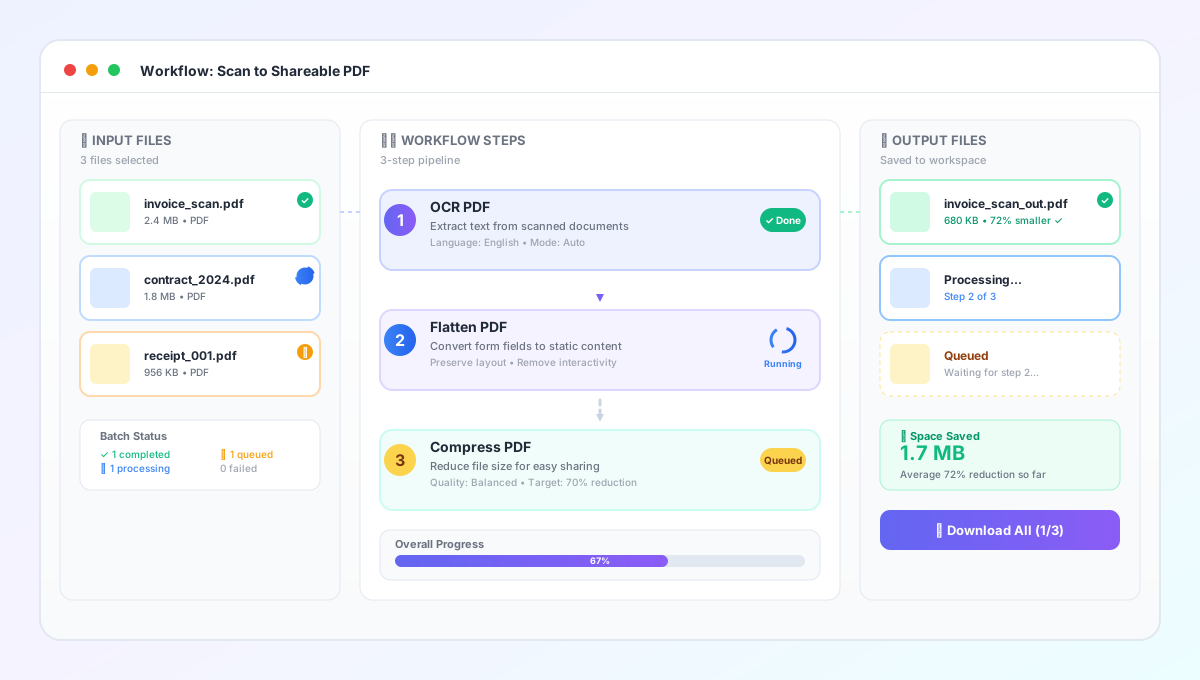
Multi-step workflows for OCR + compress pipelines
Create repeatable automation for scanned PDFs, invoices, resumes, and compliance documents. Build steps once, run in batch, and track every file through each step.
How workflows work
Build steps → Select files → Run in batch → Track progress
Build steps
Chain your existing tools into a repeatable pipeline.
Select files
Choose inputs from your workspace folder.
Run in batch
Apply the workflow to many files at once.
Track progress
See queued, running, completed or failed status for each step.
Key features
What a workflow does for repeat document work
Time saved
Automate repeat steps and batch runs.
Fewer clicks
One workflow replaces manual tool runs.
Consistent output
Same settings every time.
Progress tracking
Know what’s queued, running, or failed.
Common workflows
- Scanned PDFsOCR → compress for searchable sharing.
- InvoicesOCR → flatten → compress for archiving.
- ResumesFlatten to preserve layout, then compress.
- Compliance docsStandardize output with repeatable steps.
Usage guide
Tips: choose the OCR language, flatten only when needed, compress last, and save outputs to a folder you control.
Related tools
Use these tools inside workflows — or run them standalone.
Workflows FAQs
Common questions about multi-step automation, supported tools, plans and team access.
Workflows use the existing FlexFiles tools as steps. Popular steps include OCR, flattening and compression, and each step's output feeds the next.
Starter, Pro and Business. The Free plan doesn't include workflows; on Free you can still run each tool on its own.
Yes. You can set a workflow to run when members of your workspace upload files to a chosen folder, so new files are processed without a manual run.
Workflow steps consume your normal conversion quota because each step runs an existing tool. In team workspaces, usage is billed to the workspace owner’s plan.
Outputs are saved to the output folder you choose when you run the workflow, and each file's step history is kept in the run details.
Owners and editors can run workflows. Viewers can browse read-only and may need to ask the owner to enable or upgrade Workflows.
Need more help? Reach out to our team.