Workflows
Créez, exécutez et suivez des automatisations multi-étapes en un seul endroit.
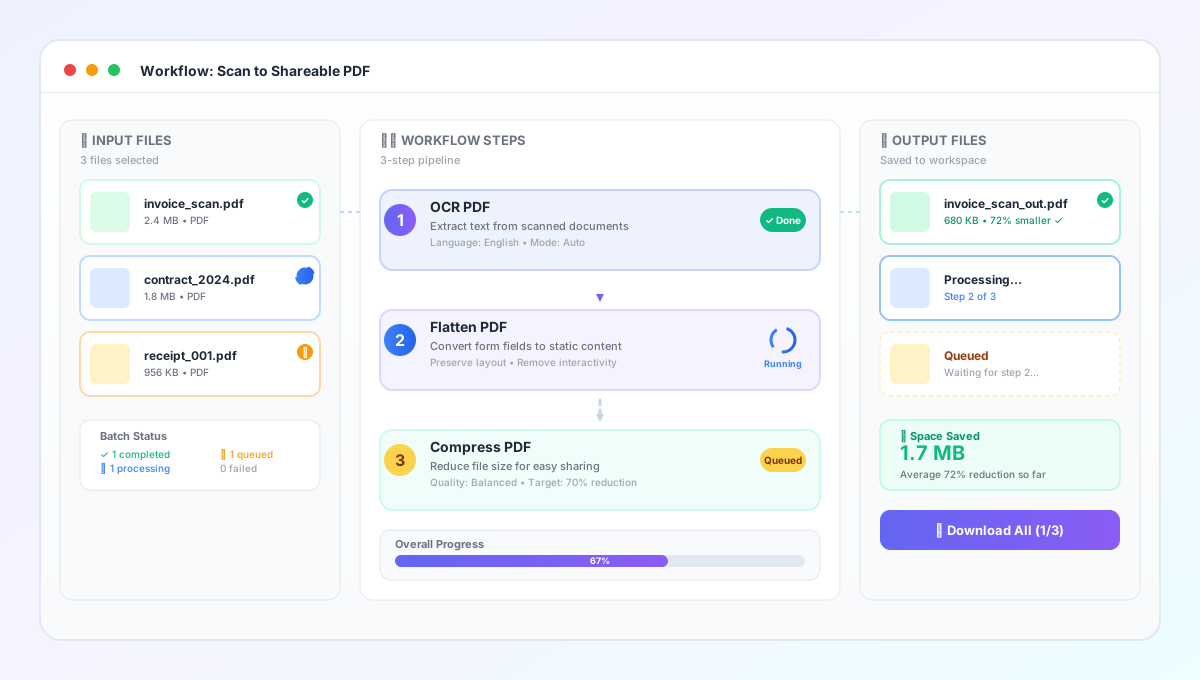
Build multi-step file workflows to automate batch conversions like OCR → flatten → compress. Run pipelines in bulk and track step-by-step progress.
- Multi-step file workflows
- Batch automation for documents
- OCR + flatten + compress pipelines
- Step-by-step progress tracking
- Saved presets for repeatable runs
Workflows FAQs
What are Workflows?
Workflows let you chain multiple tools into a repeatable multi-step pipeline and run it on many files in batch.
Can I run OCR + compress as a single pipeline?
Yes — a common workflow is OCR → (optional) Flatten → Compress to produce searchable, shareable PDFs with consistent output.
Where do workflow outputs go?
Outputs are saved to the folder you select when running the workflow, and each file's step history is tracked in the run details.
How does billing and quota work for workflows?
Workflow steps consume your normal conversion quota, since each step runs an existing tool. In team workspaces, usage is billed to the workspace owner's plan.
Who can run workflows in teams?
Editors and owners can run workflows. Viewer roles can browse read-only and may need to ask the owner to enable or upgrade Workflows.